
Guide
Structure customer folders
Use folders to keep customer documents organised, easier to understand, and easier to find again later.
Overview
Folders help customers understand what they have received and where to find it again. They are especially useful when you send different types of documents over time, such as reports, statements, agreements or policy documents.
How folders work
Folders can be applied when you send a document. The method depends on how you are sending: from the web app, by email, or through the API.
Web send
Choose or create a folder before sending the document from the Documentd admin portal.
Copy-in / BCC
Add a folder instruction to the email if you want Documentd to place the document into a specific folder.
#deliver
Add #folder Reports alongside
#deliver when sending by email.
API
Pass the folder name as part of the delivery request so documents are organised automatically.
Example: applying a folder by email
When sending by email, you can include a folder instruction in the subject or body.
Hello,
Please find your monthly report attached.
Kind regards,
Your Company
#deliver #folder Reports
Recommended folder names
Use simple folder names that customers will understand later. Avoid internal team names, abbreviations, or workflow labels that may not make sense to the customer.
Reports
Monthly, quarterly or annual reports.
Statements
Account statements, financial summaries or transaction records.
Agreements
Contracts, signed documents and terms.
Policies
Insurance policies, schedules and renewal documents.
What the customer sees
The document appears in the folder you specify, helping customers browse their vault by document type.
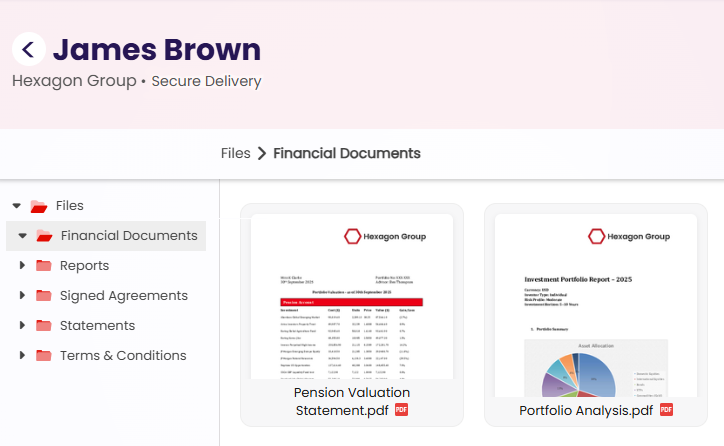
Clear folders make documents easier to find again later.
Best practices
- Use customer-friendly names rather than internal labels.
- Keep folder names short and obvious.
- Use the same folder names consistently across your team.
- Avoid creating too many folders too early.
- Choose names based on how customers will look for documents later.
Next step
Learn more about email sending and what customers receive after delivery.